
The obligation to record working time will apply to all Belgian employers starting January 1, 2027. The first reflex for many business leaders is to buy a digital time clock or a dedicated time tracking software. Simple, quick, and seemingly cheaper. But does that calculation really hold up?
And if you already use Odoo, or are considering it, the question may not even arise.
The “time tracking software” reflex and why it deserves to be questioned
When faced with a legal obligation, the natural reflex is to look for the most direct tool. A digital time clock, a check-in / check-out system, or attendance tracking software: it records hours, complies with the law, and gets the job done.
This reasoning is sometimes valid. But for many Belgian companies, especially those managing projects, billing based on time spent, or already using a management system. This choice creates a problem they do not yet see: another tool to manage, siloed data, and double data entry that costs time every single month.
The real question is not “Which time clock should we buy?” but rather “How will this working time data support and improve our organization?”.
What standalone time tracking software does well and its real limitations
Let’s be honest : a good dedicated worked-hours tracking solution does exactly what it is designed for. Solutions such as Protime, Shyfter, or Kelio are solid tools for basic HR use cases.
What standalone solutions do well
- Reliable clock-in / clock-out recording RFID badge, PIN code, or mobile app
- Management of flexible schedules, shifts, and part-time work
- Automatic calculation of overtime and overages
- Exportable attendance reports for payroll or labor inspections
- Simple interface and fast deployment a few days are enough
- 2027 legal compliance covered they meet the ECJ criteria of being objective, reliable, and accessible
The limitations few vendors mention
The issue is not what these tools do, it is what they do not do, and the friction this creates on a daily basis.
- Siloed data : recorded hours remain inside the time tracking software. To transfer them to payroll, scheduling, or project tools, companies must export, import, or build API integrations between systems
- Unavoidable double data entry : if you manage project timesheets, employees enter their time twice: once in the attendance terminal and once in the project tracking tool
- No connection to invoicing : hours do not automatically generate invoice lines
- No visibility into profitability : you know how many hours were worked, but not on what, or whether the work was profitable
- One more contract to manage : additional license, additional support, and integrations to maintain over time
The hidden cost of double data entry
A company with 50 employees that manually exports data from its digital time clock to payroll every month loses between 2 and 4 hours of HR work. Over a year, that represents an entire work week spent moving data that could circulate automatically, not to mention re-entry mistakes, a frequent source of payroll disputes.
What integration within an ERP like Odoo actually changes
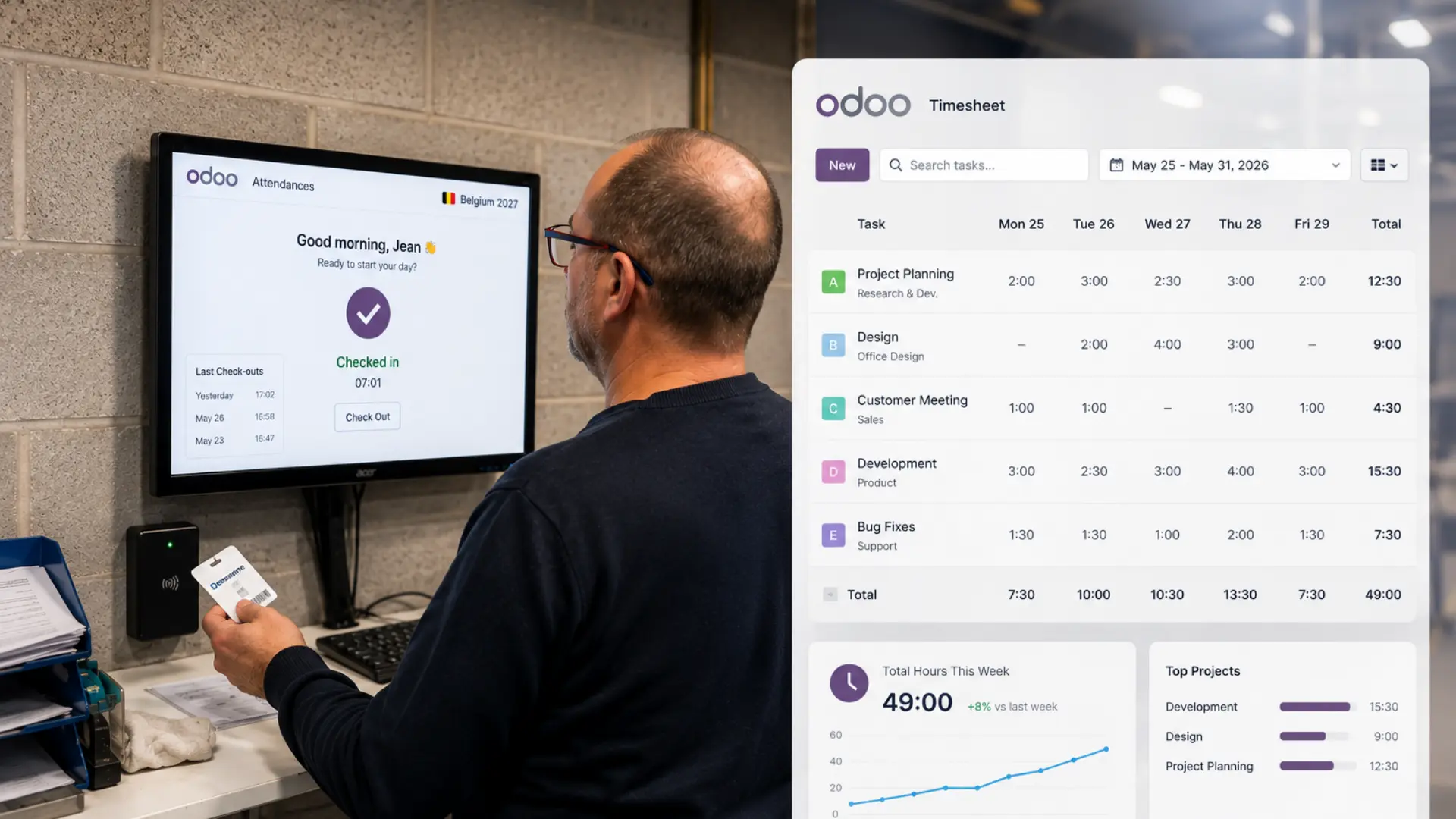
In Odoo, the Attendance module is not an isolated time tracking system. It is part of an integrated business management platform where every working time entry automatically feeds the rest of the organization.
When an employee clocks in through Odoo Attendance:
- Hours are immediately available for Odoo Payroll : without exports, imports, or manual re-entry
- If the company uses Timesheets, the data can automatically be linked to projects and customers : one entry, two records updated
- Leave requests and absences are managed within the same system : managers get real-time visibility on actual team availability
- Overtime is calculated and automatically transferred to the HR or payroll modules
- Managers get a consolidated overview : attendance, anomalies, labor costs without switching between multiple interfaces
That is the difference between simply recording time and managing your organization through time data.
To better understand the distinction between Attendance and Timesheets in Odoo, read our article :Odoo attendance vs Odoo timesheet which one do you need to be compliant in 2027?

“What has improved since the implementation of Odoo is the tracking, live tracking of a lot of information. It is automatically linked to the project so that I can have a live view of the profitability of each and every project.”
Axel Soyer, CEO · Desimone, Charleroi (industrial robot manufacturer)
The pricing argument : what many companies do not know
This is probably the least known and most decisive point for many business leaders.
With Odoo, you pay per user, not per module. An employee who already has access to Odoo CRM or Odoo Sales automatically has access to Odoo Attendance and Odoo Timesheets, at no additional cost. The modules are included in the user license.
In practical terms: if your organization already uses Odoo for other business functions, your 2027-compliant time tracking solution is already included in what you are paying for. You simply need to activate the module and configure it with your Odoo partner.
By choosing Odoo Attendance instead of standalone software, you avoid:
- An additional annual license for a separate time tracking solution
- The development or purchase of an API integration between the time clock and your ERP
- The ongoing maintenance of that integration every update can potentially break it
- The support costs of an additional software vendor
Already using Odoo? Then the question is already solved.
Activating Attendance in your existing Odoo instance does not require any additional license cost. The only investment is configuration and training, performed once, within your current system, by your Odoo partner, no new contract. No new data silo.
Functional comparison: standalone time clock vs Odoo attendance
| Feature | Standalone Software | Odoo Attendance |
| Check-in / check-out recording | Yes | Yes |
| RFID badge, PIN, mobile | Yes | Yes |
| Facial / fingerprint recognition | Depends on the solution | Yes, deployed by Eezee-it |
| 2027 legal compliance | Yes | Yes |
| Integrated leave management | Often separate | Yes, same system |
| Automatic payroll integration | No, export or API required | Yes, native |
| Project and client tracking (timesheets) | No | Yes, with Timesheets |
| Billing based on worked hours | No | Yes, with Timesheets |
| Project / client profitability tracking | No | Yes, with Timesheets |
| Consolidated HR + project manager view | Limited to attendance tracking | Yes, everything inside Odoo |
| Additional cost if Odoo already exists | Yes, separate license | No, included |
| API iIntegration required | Yes, needs development | No, native |
Who each solution is suitable for by Belgian company profile
| Recommendation | Profile | Explanation |
| Standalone may be sufficient | Small structure, < 15 people | No project management, no hourly billing, no ERP in place. Single need: record working hours for 2027. A dedicated time-tracking tool does the job and it’s honest to say so. |
| Odoo recommended | SMEs already using Odoo | Attendance is included in your license. Activating it is the most logical and cost-effective decision and the only one that avoids creating another data silo in your organization. |
| Odoo recommended | Services, consulting, IT, engineering firms | You bill based on time spent and manage projects. Attendance + Timesheets in Odoo connect legal time tracking, time-based billing, and client profitability without double data entry. |
| Odoo recommended | Manufacturing, construction, energy | Shifts, multi-sites, field teams, and job cost tracking. Odoo Attendance configured by Eezee-it gives you operational visibility that a standalone digital badge system cannot provide. |
| Odoo recommended | SMEs with 20–50 employees without ERP | The 2027 obligation is often the right moment to structure your management system. Instead of adding a standalone time-tracking tool to an already fragmented stack, Odoo centralizes attendance, payroll, projects, and invoicing with a gradual rollout based on your priorities. |
| Odoo recommended | Multi-site or growing companies | A standalone time-tracking system quickly becomes a problem at 50 employees or across multiple sites. Odoo scales with you, same instance, same data, same visibility across all locations. |
The real cost over 3 years, not the listed price
Comparing the price of a time-tracking software with Odoo based on the catalog price is misleading. What really matters is the total cost of ownership including everything the listed price doesn’t show.
| Cost Item | Standalone Software | Odoo (if already a client) |
| Annual license | Additional cost, depending on the solution and number of users | Included in the existing license, zero additional cost |
| Setup and training | Initial deployment cost | Initial deployment cost one-time only, within your existing system |
| Payroll / ERP integration | API to develop or purchase often a significant cost | Native integration, no development required |
| Integration maintenance | Recurring at every update of both tools | None, same system, same update cycle |
| Double data entry (human Cost) | Minimum 2 to 4 HR hours/month, every month, every year | Zero, data flows automatically |
| Vendor support | One more contract to manage | Same Eezee-it team for the entire Odoo system |
| Total real cost (3 years) | License + integration + maintenance + recurring human time | Setup + training one-time cost, nothing recurring on top |
This table does not provide precise figures because every situation is different. But the cost structure is clear: what looks “cheaper” at first is rarely the least expensive over 3 years once you factor in API integration, maintenance, and the human time lost every month due to double data entry.
And if you don’t already use Odoo ?
The 2027 requirement is often the right moment to assess whether an integrated ERP makes sense for your organisation not just for time tracking, but for your entire HR, project, and invoicing management. At Eezee-it, we carry out this analysis during an initial call: we review your situation and real needs, and we give you an honest answer on whether Odoo is the right fit or if a simpler tool is enough.
Standalone or Odoo ? We analyse your situation together
A 30-minute session with our team to review your context and give you an honest answer on the solution best suited to your Belgian organisation.

FAQ
Odoo attendance, timesheet and 2027 compliance in Belgium
Yes, provided it meets the three CJEU criteria: objective (records cannot be modified retrospectively), reliable (secure and traceable timestamping), and accessible (available to each employee). Most serious Belgian digital badge solutions meet these requirements. Legal compliance is therefore not a differentiating factor, it is the operational value beyond compliance that truly makes the difference.
No. In Odoo, you pay per user not per module. Attendance is included in your existing license. The only investment is configuration and training, carried out once by your Odoo partner. No additional license, no new contract.
Technically, yes. But it requires initial development, ongoing maintenance, and creates a dependency between two systems. Each update on one side can impact the other. This is exactly what native Odoo attendance avoids data flows seamlessly without any integration to maintain.
Yes. Odoo can be connected to existing physical time clock terminals via connectivity modules. If you already have badge systems in place, we assess together whether they are compatible with Odoo or whether it is better to replace them with a native Odoo kiosk depending on their age, protocol, and your on-site context.
Attendance records presence when an employee starts and ends their working day. Timesheet tracks time by activity on which project, which client, which task. Both are complementary and included in the Odoo license. For a complete guide on this choice, refer to our dedicated article: Odoo attendance vs Odoo timesheet which one do you need to be compliant in 2027?
On an existing Odoo instance, a few weeks are enough to deploy Attendance. If you are starting from scratch with Odoo, you should allow 3 to 6 months for a full deployment, including payroll and project management. That’s why we recommend not waiting until 2026 to start the project, a rushed deployment always ends up costing more than a well-planned implementation.
Software for time tracking or Odoo ERP: which one should you choose to record working time in Belgium?